
Generative AI may be both the most useful and the most mystifying tool of our modern-tech era.
The problem—aside from all the endlessly documented issues around accuracy—is that generative AI generally seems to function in a DOS-like blank prompt form. The onus is squarely on you to figure out what to ask and how to put these saucy systems to use.
That black-box feeling is especially apparent when you look at NotebookLM, an “AI-first notebook” launched by Google nearly two years ago. The idea behind NotebookLM is that you upload your own source materials within carefully confined notebooks, and you can then lean on Google’s Gemini AI to interact with that material in all sorts of illuminating ways.
Since each notebook is limited only to whatever source materials you supply, the prevalence of those pesky hallucinations seems to be less of an issue. And since everything within your NotebookLM notebooks is kept completely private—not even used for any manner of AI model training, according to Google—you can connect it to all sorts of subjects and use it to gain a level of deep insight that was never before so easily accessible.
But again, there’s the black box challenge. When you first pull up NotebookLM, it’s tough to know where to begin and how to interact with the thing in practical, approachable ways. Even as someone who writes about technology for a living and has spent more time than most mortals thinking about this service, I realized I hadn’t entirely figured out how to use it in a way that would genuinely be helpful in my day-to-day life.
So I challenged myself to dig deep, get beyond all the conceptual excitement, and come up with a series of real-world use cases for NotebookLM that any regular human could both appreciate and emulate. I’ve got 15 super-specific scenarios, all tried and tested, in which the artificial intelligence answer machine could be useful for you.
Follow this road map and see which path holds the most promise from your perspective.
1. Your on-demand product answer machine
Up first is a possibility that’s supremely simple yet packed with productivity potential: Create a new NotebookLM notebook called “Product Manuals.” Then, every time you purchase a new appliance or device of some sort, search the web for a PDF version of its manual and add it into the notebook.
If you really want to get wild, include an image of any warranty cards, too.
Then, anytime you need to know anything about those products—how some part of them works, how to fix something that’s gone awry, or if and how you’re eligible for a warranty-related repair—just fire up that same NotebookLM notebook and ask, ask, ask away.
2. Your instant car support system
Next, try using NotebookLM to help wrangle the most expensive gadget you own. Do a similar web search for your current vehicle’s owner manual, then drop it into its own NotebookLM notebook with the vehicle’s name as the title. Repeat for any additional vehicles you own and any new ones you purchase down the road.
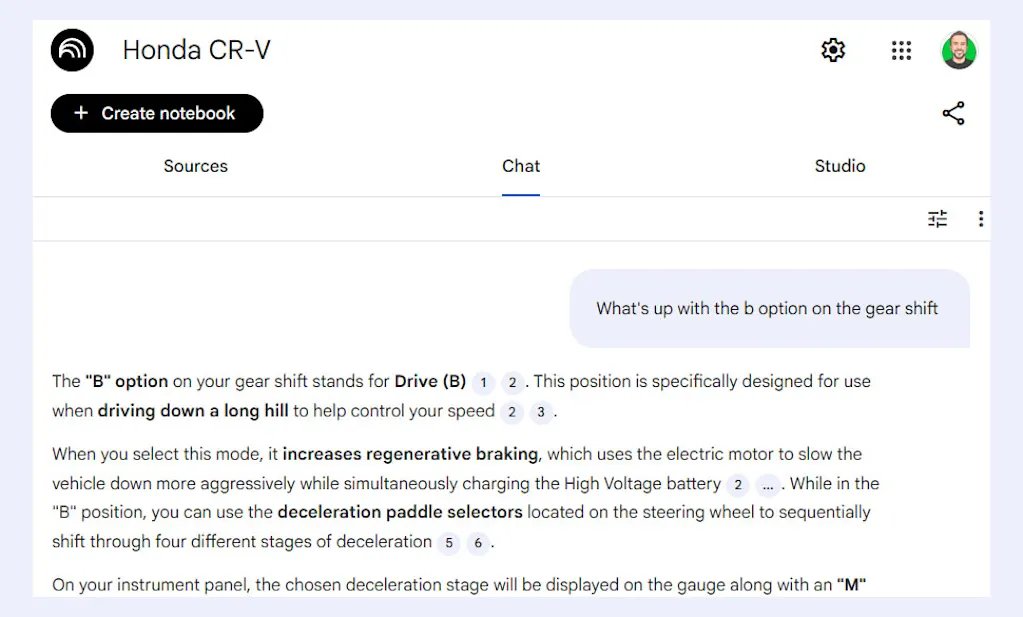
After recently trading in our old minivan for a hybrid Honda CR-V, my wife and I wasted far too much time flipping through the vehicle’s paper manual to try to figure out what some random button on the dashboard did.
Later, after downloading a PDF of the manual from Honda’s website and then uploading it into NotebookLM, it took me all of 10 seconds to reach the same answer—simply by asking.
Lesson learned.
3. An interactive car maintenance journal
While we’re thinking about cars, every time you go to the mechanic, snap a photo of the service receipt and upload it into a NotebookLM notebook created specifically for that one vehicle.
You can make it even more useful by uploading the same owner’s manual you found a moment ago into that notebook, too.
Doing so will give you two very practical benefits:
- First, anytime a question comes up about what work you’ve had done on the vehicle or when a certain repair took place, you can just pull up that notebook and ask.
- Second, with the manual and its instructions there alongside all of your history, you can bring the two sources of info together to ask NotebookLM targeted questions that take the manufacturer’s guidance and your past services into consideration—like, for instance, when you should rotate your tires next or what other possibilities you should be thinking about at your next oil change appointment.
And on a related note . . .
4. An interactive home maintenance journal
Start a NotebookLM notebook for your house, then upload every invoice and estimate you get for a home repair as well as every receipt from a new appliance purchase.
Whenever you next need to know when, exactly, your roof was replaced or in what year you got your current furnace—or even what brand and model it is—you’ll have a single simple place to ask and get answers.
And that’s a heck of a lot easier than having an overflowing folder of assorted old papers to sift through in every such scenario.
5. Your personal company wiki
Does the company you run, or maybe just work for, have more handbook-type info than any reasonably sane human could possibly ingest and remember? If so, use a dedicated NotebookLM notebook to store all of it—guides, documents, operating procedures, even lists of contacts for different departments and purposes.
From that moment forward, when a question comes up about how something is supposed to work or whom you’re supposed to contact for some particular purpose, your answer will never be more than a single quick question away.
6. Your instruction-expert wizard
Why limit yourself to work, maintenance, and appliances? With anything that has an instruction manual involved, dump a digital version of the document into its own NotebookLM notebook—even for board games. The next time any kind of question comes up related to those instructions, you’ve got a fast and effective way to get answers.
7. A contract deposit box
Whether you’re a freelancer juggling new contracts every month, an employee signing a new agreement each year, or an employer asking dozens of workers to sign your ever-evolving documents, creating a centralized repository for all your contracts can be a real time-saver in the future.
Need to remember when you last signed something with a specific person or provider? Not sure what the terms of some agreement required—or when a particular document expires?
Whatever the case may be, once the info’s all in NotebookLM, you’ve always got an easy place to ask—and let the system find the answer for you.

8. Your meeting memory
Provided you’re using something to record important meetings—be it a general-purpose AI-powered note-taker, a video-call-specific summarizer, or an app designed to take notes during regular audio calls—that history will be much more useful if you bring it over to a NotebookLM notebook.
With such a system in place, you can simply go to NotebookLM and ask targeted questions about any of your past meetings instead of having to dig through the transcripts individually.
9. An interview inquiry station
While we’re thinking about transcripts, if you conduct any kind of interviews—with job candidates, as a journalist, or for any other purpose—take each transcript and create a NotebookLM specifically for it. (Or, if you have a group of related interviews, put them all in one notebook.)
Upload either the audio or the text, depending on what’s available, and then take the opportunity to ask NotebookLM questions about your conversation—be they specific (like what the person said about some particular topic) or broad (like asking NotebookLM what interesting quotes came up during the interview that you might have missed).

You’ll obviously still want to refer to the full transcript at times—and to double-check the accuracy of any quote you’re actually citing anywhere—but it can be a helpful way to find something fast when you can’t remember the exact words involved or to stumble onto something you might have otherwise glossed over.
10. An intelligent feedback interpreter
If your business relies on any manner of feedback to guide its operations, do yourself a favor and create a NotebookLM notebook where you can upload those results—as spreadsheets or in whatever form they take. From reviews to survey responses, you’ll then be able to ask NotebookLM to help summarize the key themes and trends, pick out recurring positive or critical responses, and even find particularly memorable quotes for potential testimonial use.
11. Your performance review reviewer
For anyone managing employee performance, NotebookLM can be a major asset. Create an individual notebook for each employee and place all their performance reviews there—then, when the time comes for the next assessment, you’ll have an easy way to revisit past highlights to identify trends and provide context for comparison.
12. A financial reality checker
Provided you’re comfortable with the notion, NotebookLM can turn up some really interesting insights by analyzing things like your tax returns, bank statements, and credit card statements over the years. (For what it’s worth, Google is explicit about the fact that it doesn’t in any way access, share, or use any data uploaded into NotebookLM—even for AI model training.)
With that type of info in its own dedicated notebook, you can ask NotebookLM to give you an overview of your spending habits, to identify areas where you could cut back or potentially be eligible for additional tax benefits, and to surface other such pointers that you can then investigate more thoroughly on your own or with an accounting professional.

13. An audio-video reading resource
Ever find yourself running into interesting-looking videos or podcasts and just not having the time or inclination to sit through them in their entirety?
Make yourself a NotebookLM notebook called “Audio-Video,” then drop a link to any YouTube video or audio clip you encounter into that area. You can then ask NotebookLM for the high points—or for any specific info you’re looking to find—from any of the clips individually or even collectively.
14. An elevated reading list
NotebookLM can be a fantastic way to collect links you want to read for later revisiting. With a notebook called “Reading List,” you can see the entire text of any article whose URL you add in, right then and there and in a stripped-down and simplified format—and you can ask NotebookLM for information about, or even summaries of, any or all of your saved links, too:
- What was that article I saved from New York a while back?
- Give me the most important takeaways from that Fast Company piece I saved on privacy the other day.
- I’m never going to catch up with everything I saved this week. Show me a summary of all the articles I added over the past seven days.
You get the idea.
And finally . . .
15. Your calendar companion
Get a whole new level of insight into how you’re spending your time and what’s actually gone down on your calendar by exporting your complete calendar history, and then importing it into NotebookLM—where you can create a custom notebook to interact with it.
In Google Calendar, this is as easy as clicking the gear-shaped icon in the desktop website’s upper-right corner, selecting “Settings,” then clicking “Import & export” in the left-of-screen side menu and clicking the “Export” option.
You’ll then need to take the resulting .ics file and convert it into plain text—which you can do in a matter of seconds with a free conversion website like this one.
Finally, with the resulting .txt file in a NotebookLM note, try asking questions about anything from how many meetings you attended over a given time period to how many hours you spent at the doctor’s office last year. You can also ask for specific info such as how often, on average, you get haircuts or how long it’s been since you last had a job interview.
~
google-notebooklm-calendar.jpg
You might be surprised at the types of insights you uncover with your calendar data in NotebookLM’s metaphorical hands.
~
The possibilities are practically endless—and all you’ve gotta do is ask.
For even more practical productivity discoveries, check out my free Cool Tools newsletter—a single new tech treasure in your inbox every Wednesday.