
Written by Atul Gupta, Analytics Manager — LUS Support Ops, Lyft
At Lyft, getting operators and riders connected quickly and reliably depends on more than technology — it depends on the teams working behind the scenes to keep that technology running smoothly. For the operators managing Lyft’s fleet across markets, having fast, reliable access to support is what keeps bikes on the road, stations stocked, and issues resolved before they affect riders. Building the infrastructure that makes that support possible is what our team does; this is the story of how we built it.
When I first joined Lyft Urban Solutions’ (LUS) Support Ops team in 2020, ticketing processes for our operators were still being established. There was no reliable way to raise issues, track progress, or get routed to the right person. We had a Jira Help Center, but it had become increasingly difficult to navigate.
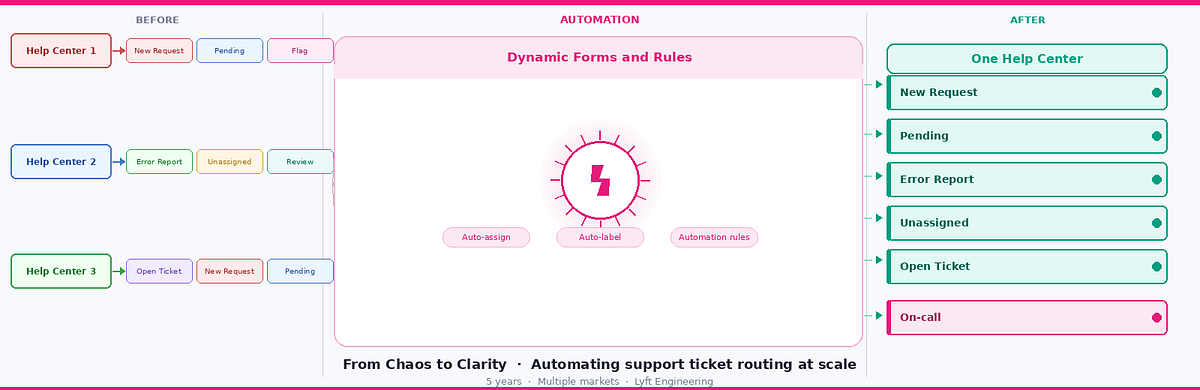
What followed was a five-year journey of transforming that chaos into a streamlined, automated, self-routing system that now handles thousands of tickets per year, with one third of those routed automatically — saving hours of manual triage work annually.
The Problem: Organic Growth Gone Wrong
On the surface, a Jira Help Center sounds like a reasonable solution. In practice, ours had become a maze. Here’s what we were dealing with:
- Duplicate intake forms doing the same job under different names
- Redundant categories with no clear ownership
- Forms that didn’t capture the right information upfront, forcing follow-up back-and-forth
- No auto-labeling, so tickets couldn’t be searched or reported on
- No routing logic — every ticket needed a human to read it and manually assign it
- No dashboards — leadership had zero visibility into ticket volume or trends
With this system, tickets would’ve taken the team 10–15 minutes to manually triage. It was time to redesign the system.
Phase 1: Restructuring
Before building anything new, we had to tear down what wasn’t working. I started by auditing every intake form in the portal. I found forms that hadn’t been used in years sitting alongside forms that overlapped almost entirely in purpose.
Cleanup started in one of our Help Centers, we consolidated redundant intake forms into smarter, dynamic forms. But this was only the beginning. Over time, the Help Center grew far beyond operation support. Today it serves multiple categories spanning all Lyft Urban Solutions operated market teams, which includes operations, field support, data, marketing, engineering and more. The key tool that made this scalable was Jira’s Proforma, a form builder that lets you create conditional branching logic within a single intake form, capturing the right information for each category without overwhelming the submitter.
Instead of having separate forms for each issue category, we created a single dynamic form with an “Issue Type” dropdown. Depending on what the operator selected, different fields would appear and only ask for information relevant to that issue type. This same pattern was then applied across all categories as the Help Center expanded.
This eliminated confusion immediately. Operators no longer had to decide which of three similar-looking forms to use. There was one form and it asked the right questions.
Phase 2: Automating
With cleaner forms in place, we could now build the intelligence layer on top. Jira automations became the backbone of this system.
Automatic ticket routing was the first win. Using the data captured in our Proforma fields, we set up automation rules that would:
- Auto-assign tickets to the right team member based on issue type and sub-category
- Add the correct label (from our 30+ label taxonomy) the moment a ticket was created
- Send automated acknowledgment replies to reporters so they knew their ticket was received
- Trigger PagerDuty alerts for P0 incidents, routing to the correct on-call engineer based on the specific incident type selected in the form
The PagerDuty integration deserves a special mention. Previously, when a P0 blocker occurred — for example, the app going down for 5+ operators — the reporter would submit a ticket, a human would read it, identify which engineer was on call for that issue type, and then page them. That chain of manual steps added critical minutes during an active incident.
Now, when an operator selects “P0 Operating Software Incident” and specifies the incident type, the system automatically pages the right on-call engineer. There are no humans needed for an initial escalation.
Additionally, we implemented an automation that comments on and automatically closes a ticket if the user creates a P0 ticket utilizing a standard form or subsequently attempts to elevate that existing form to a blocker priority. This was essential because a regular ticket with blocker priority does not trigger an alert to an on-call engineer.
A significant portion of tickets per year now route automatically. At 10–15 minutes saved per ticket, multiple hours of manual triage work are eliminated annually.
Source: eng.lyft.com