

As an endurance athlete in 2026, you have access to more training data than ever before. It’s no longer about pace and power anymore: your device can collect data about every step, breath, and heartbeat. And while you have so much information at your fingertips, it doesn’t really matter if you can’t actually interpret what it means.
If you’re collecting data and not making any meaningful decisions from it, you’re collecting data just for the sake of collecting it.
TrainingPeaks Athlete Home solves that problem by taking all of your training data from multiple devices (whether it’s Garmin, Polar, Oura, COROS, WHOOP, or whatever you prefer) and putting it into one place. You can just check your Athlete Home to see how you’re recovering, whether you’re gaining or maintaining fitness, which workout you have on deck, how you’ve been feeling lately, and how many weeks until your next race.
Here are some ways Athlete Home can help you make more sense of your training.
Start with a daily snapshot of your training
At the top of your Athlete Home, you will see three metrics: Fitness, Form, and Fatigue. These are your Performance Insights.
Instead of looking at a single workout, Performance Insights helps you see how your recent training is affecting your Fitness, Form, and Fatigue. These trends help you understand whether you’re working hard and gaining fitness, maintaining, or recovering from a demanding block of training.
Fitness
Fitness reflects your longer-term training load and how it has changed over the past 42 days.
Your current trend is summarized in clear language, so you can quickly see whether you are:
- Going Hard
- Productive Training
- Keeping Fit
- Recovering
Note: a higher training load is not automatically better. It all just depends on where you are in your training cycle. You probably want to see productive training during a build phase, for example, while a recovering trend is ideal before an important race.
Form
Form shows your current training readiness by looking at the balance between your longer-term fitness and short-term fatigue.
Your Form trend will show whether you are:
- Recharging
- Fresh
- Maintaining
- Optimal
- Overloading
Feeling tired during a challenging training block might be expected, while feeling unusually depleted for an extended period may be a signal to take a closer look at your recovery.
Fatigue
Fatigue reflects your recent training load and shows whether your fatigue is increasing, holding steady or decreasing compared with the previous day.
This is useful during demanding training blocks, recovery weeks, and race prep, as it allows you to see when your workload is accumulating and when your body is beginning to absorb it.
Zoom out to see your progress over time
Your daily snapshot is just the beginning. If you tap into your Performance Insights charts, you can explore trends over the past 7, 30, 90, or 180 days. You can also select a specific point on the chart to review your metrics from a particular day. This makes it easier to connect the dots between your training plan and your fitness has changed over time.
For example, you might notice that your fitness steadily increased throughout a consistent training block, your fatigue rose after a demanding week, or your form improved as you reduced your workload leading into an event.

Understand how your body is responding
Completing workouts matters, but it’s your adaptation to the workouts that matters more. And that’s why we can’t neglect recovery.
Health Insights pulls data from devices such as Oura, WHOOP, Garmin, and many others and displays it on Athlete Home next to your training. These metrics include:
- Heart rate variability (HRV)
- Resting heart rate (RHR)
- Sleep analytics
These metrics can provide additional context for how your body is responding to your workload.
But the best part is that Health Insights monitors trends, not just a daily metric. That’s because a single night of poor sleep or an unusual HRV reading usually doesn’t warrant alarm. But looking at your trends over time can help you recognize things that may be worth paying attention to.
Use the date picker to explore your Health Insights over the past 7, 30 or 90 days. Your trend indicator will update automatically based on the timeframe you select.

Add context with Training Insights
Objective data is great, but you’re not a robot. And you shouldn’t expect yourself to train like one, either.
Tracking how you feel day to day gives you a better understanding of your training. Training Insights combines two subjective metrics:
- Rate of Perceived Exertion (RPE)
- Feeling
Athlete Home shows your 7-day averages of each, giving you a quick read on how hard you’ve been working.
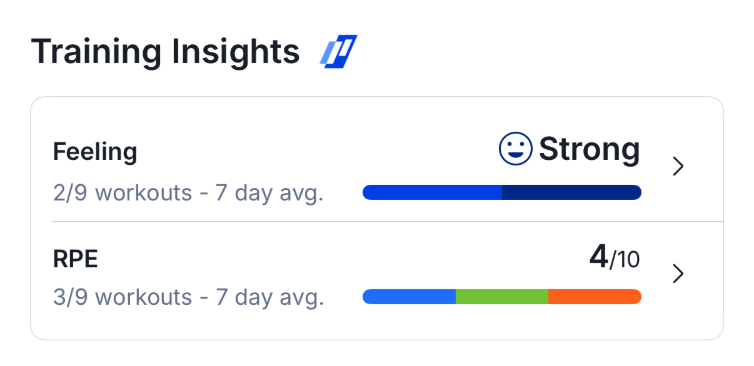
Tap the Training Insights card to explore up to 90 days of workout history. The detailed chart displays RPE and Feeling as trend lines alongside Intensity Factor (IF), which adds an objective measure of workout intensity.
Customize Athlete Home around your priorities
No two athletes are the same. And depending on your goals or where you are in your season, your priorities change.
Athlete Home allows you to choose which sections appear first and arrange them in the order that is most useful for your training.
You can:
- Reorder sections using drag handles
- Hide sections you don’t need
- Restore the default layout at any time
- Sync your preferred layout between mobile and web
Performance Insights will always remain visible at the top of the page, giving you a consistent daily snapshot of your training. And hiding a section does not remove any of your underlying data. You can re-enable it whenever you want!

Don’t just track data. Put it to work!
Training isn’t about one workout, one number, or one day. It’s about cumulative work and consistency. And that’s the beauty of Athlete Home: putting it all together so you (and your coach) can make better decisions about your training.
For example, if you’re doing a hard training block, seeing your Fitness rise and Fatigue increase shows that you’re putting in good work. But if your HRV is trending down, your resting heart rate is elevated, and your Feeling score is lower than usual, that may be a sign that you need to pull back the reins.
On the other hand, if your Fitness is holding steady, your Fatigue is dropping, and your Form is moving toward Fresh or Optimal, you may be entering a good window for harder training, a key workout, or an upcoming race.
Athlete Home makes it easy to zoom out and make sense of all the work you’ve been putting in over time: how your fitness is progressing, how much fatigue you’re carrying, how your body is responding, and how you’re feeling overall.
With TrainingPeaks Premium, you gain access to Athlete Home, along with many other features TrainingPeaks has to offer, including TrainingPeaks Virtual, Strength Builder, Stack Up, and more.
Ready to get started? Upgrade to TrainingPeaks Premium and start using Athlete Home today!